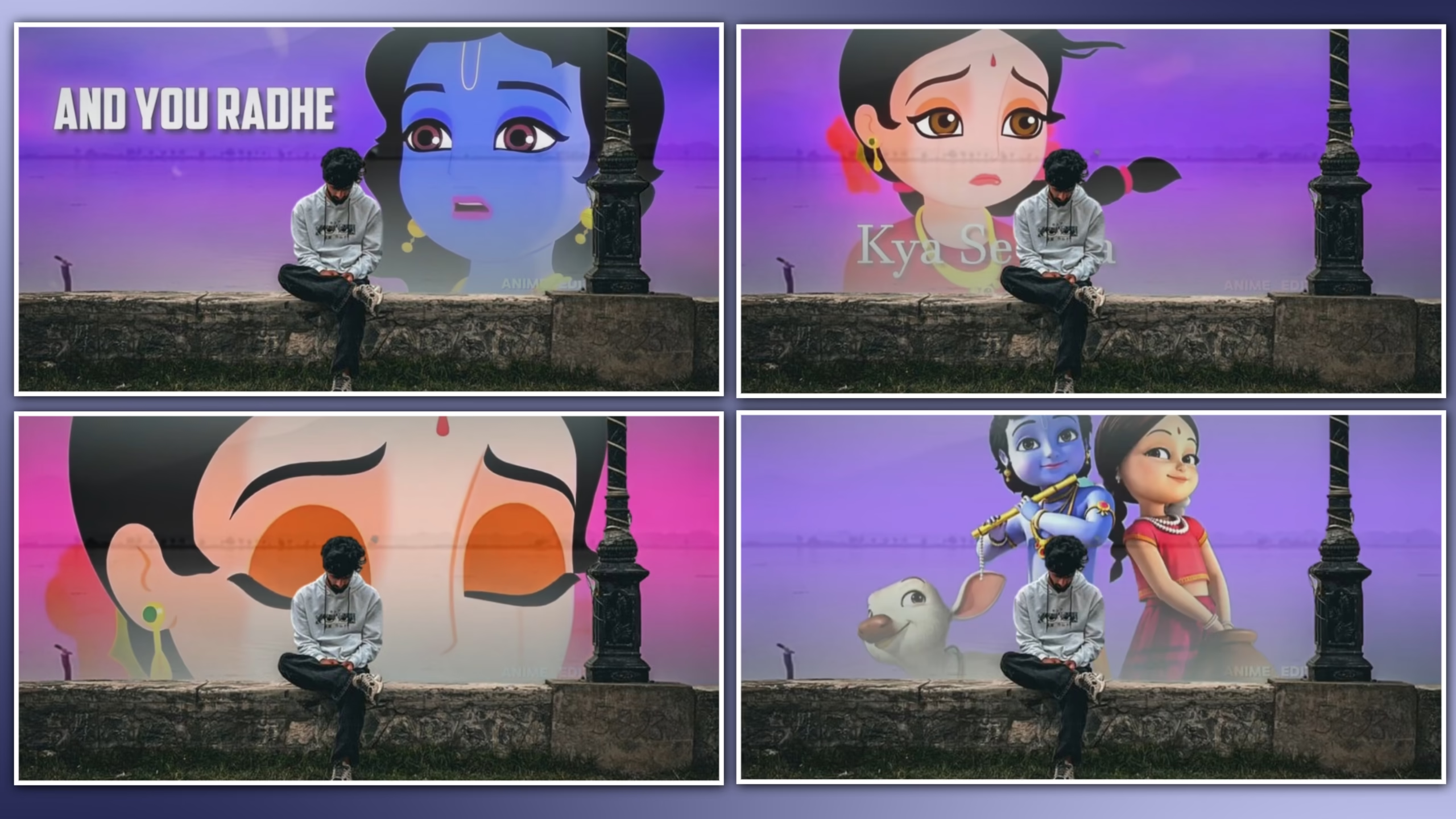
If you have been watching Instagram Reels lately, you must have come across beautifully edited Lord Krishna videos with cinematic effects, vibrant lighting, slow-motion, and devotional music. Such reels have become popular in recent times due to their ability to captivate the audience with a blend of creativity, spirituality, and modern-day editing techniques.
Whether it is Janmashtami celebration videos, devotional status videos or aesthetic Krishna reels, this editing trend is one of the most interesting ones. People are using their phones and apps such as CapCut, Alight Motion, and other software that utilizes artificial intelligence to transform images and video clips into beautiful videos that resemble professional ones.
The good thing is that you can create these videos without having advanced knowledge in video editing or spending too much time and effort. All you need to do is use the right applications, images of lord Krishna, and the right editing tools and techniques to make beautiful videos that people will like and share on social media.
In this ultimate guide, you will get to know everything about Trending Krishna Video Editing from the best editing apps, instructions, export settings, professional tips, and common mistakes to avoid. After reading this article, you will be able to make the best videos about Krishna that would go viral and have millions of views on social media.
What Is Trending Krishna Video Editing?
Trending Krishna Video Editing is a modern method of making devotional content that includes the traditional still images or clips of the lord Krishna with cinematic effects, beautiful transitions, light glows, slow motion effects, devotional music and much more in to make the most trending devotional videos for the platforms such as Instagram Reels , YouTube Shorts, Facebook Reels, Whatsapp Status etc. All trending effect videos are made for short form videos only.
This editing style is completely different from the traditional way of making devotional content videos because in this editing style videos are made to look more attractive and engaging than usual through motion graphics,colour correction,glow effects,particular animations and camera movements so that they can grab more attention from viewers within seconds.
The boom in AI editing tools also makes this trend accessible: even an amateur can quickly create decent Krishna edits using existing ready-made tools and presets. Moreover, there are various mobile applications that can help you edit videos in the style of Krishna.
Why Is Krishna Video Editing Trending on Instagram?
Krishna-themed videos have become popular in recent years, as they encapsulate religious beliefs, creativity, and story-telling, all of which are short and entertaining. Instagram’s algorithm prioritizes videos that keep the viewers engaged till the very end, thus, making cinematic devotion videos a great way to make a significant number of followers.
One of the reasons for such popularity may be linked to the phenomenon of Lord Krishna himself. The soothing music, religious quotes, and imagery depicted in the videos fill the viewers’ hearts with positive emotions, therefore, encouraging them to express their feelings on social media by liking and sharing the publication as well as recommending it to their friends and family. Thus, such posts are more likely to be seen by a bigger audience.
Festival seasons such as Janmashtami further boost the popularity of Krishna edits, as many creators produce themed videos to celebrate the occasion. In addition, the rise of AI-powered editing tools has made it easier than ever to create professional-quality reels without advanced editing skills.
As more users search for unique and meaningful content, Krishna video editing continues to grow as one of the most popular devotional trends on Instagram and other social media platforms.
Best Apps for Trending Krishna Video Editing
Creating a professional Krishna video requires choosing the best editing program. However, to make a devotional video, you do not have to buy costly editing software. In most cases, mobile and computer editing programs come with cinematic effects, transitions, and artificial intelligence features that can enhance your video’s quality.
Here are some of the best apps for Krishna video editing:
1. CapCut
CapCut is one of the most popular video editing apps for Instagram Reels. It offers smooth transitions, keyframe animation, velocity effects, colour grading, and a large collection of filters. Beginners can easily create cinematic Krishna videos using ready-made templates or by editing manually.
2. Alight Motion
If you want advanced motion graphics and creative animations, Alight Motion is an excellent choice. It allows you to add keyframes, glow effects, blur animations, and professional transitions that make Krishna videos look more dynamic.
3. VN Video Editor
VN Video Editor provides an easy-to-use interface with professional editing features. It supports multi-layer editing, text animation, colour correction, and high-quality video exports, making it a great option for devotional content creators.
4. Adobe Premiere Pro
For creators who prefer editing on a computer, Adobe Premiere Pro offers complete control over every aspect of the video. From cinematic colour grading to advanced visual effects, it helps produce premium-quality Krishna videos.
5. After Effects
Adobe After Effects is widely used for adding cinematic particle effects, glowing light animations, and professional motion graphics. Although it has a learning curve, it delivers outstanding results for high-end devotional edits.
6. AI Video Editing Tools
Modern AI editing tools can automatically animate images, enhance backgrounds, and generate smooth camera movements. These tools save time while helping creators produce unique Krishna videos with minimal effort.
Things You Need Before Starting Krishna Video Editing
Before opening your editing app, it’s important to gather everything required for the project. Proper preparation not only speeds up the editing process but also improves the overall quality of your final video.
You should have:
- High-resolution Krishna images or video clips.
- A mobile phone or computer with a reliable editing app.
- A stable internet connection for downloading assets or uploading videos.
- Devotional background music or royalty-free audio.
- Light leaks, particle effects, or glow overlays (optional).
- Stylish fonts for titles or devotional quotes.
- Sufficient storage space for exporting HD videos.
Keeping these resources ready will make the editing process smoother and help you achieve a professional-looking result.
Step-by-Step Guide to Create a Trending Krishna Video
Creating a viral Krishna reel is easier than many beginners think. Follow these simple steps to produce a high-quality devotional video.

Step 1: Create a New Project
Open your preferred editing app and create a new project with the 9:16 vertical aspect ratio, which is ideal for Instagram Reels and YouTube Shorts.
Step 2: Import Krishna Images or Videos
Choose high-quality Krishna images or cinematic video clips. Better-quality visuals will always produce a more attractive final edit.
Step 3: Arrange Your Timeline
Place the clips in the desired sequence. Start with your strongest visual to capture the viewer’s attention immediately.
Step 4: Add Smooth Transitions
Use simple transitions such as Fade, Zoom, Dissolve, or Motion Blur between clips. Avoid using too many different transition styles in a single video.
Step 5: Apply Colour Grading
Increase warmth, improve contrast, and slightly enhance saturation to create a vibrant devotional atmosphere. Consistent colour grading gives your video a premium cinematic appearance.
Step 6: Add Motion Effects
Use keyframes to create smooth camera zooms, pans, or gentle rotations. These movements make static images feel more alive.
Step 7: Insert Devotional Music
Choose soft devotional music or instrumental tracks that match the mood of your video. Ensure the audio is balanced and does not overpower any voice or sound effects.
Step 8: Add Final Effects
Apply glow effects, floating particles, lens flares, or light leaks carefully. These subtle enhancements create a magical atmosphere without distracting from the main subject.
Step 9: Preview and Export
Watch the entire video before exporting. Check for timing issues, abrupt transitions, or text alignment problems.
Best Export Settings for Instagram Reels
Using the correct export settings helps maintain video quality after uploading to Instagram.
| Setting | Recommended Value |
|---|---|
| Resolution | 1080 × 1920 |
| Aspect Ratio | 9:16 |
| Frame Rate | 30 FPS or 60 FPS |
| Format | MP4 |
| Codec | H.264 |
| Bitrate | High Quality |
These settings provide a good balance between visual quality and file size, ensuring your Krishna video looks sharp across different devices.
Professional Tips to Make Your Krishna Video Go Viral
A nice video of Krishna is only one part of the equation. To maximize your reach on Instagram, YouTube Shorts, and Facebook Reels, you have to pay attention to other details too. Even a slight change in the production and publishing process can have a significant effect on your results.
Here are some proven tips to help your Krishna videos stand out:
1. Start with a Strong Opening
The first few seconds decide whether viewers continue watching. Begin your video with the most eye-catching Krishna image, a cinematic animation, or an inspiring devotional quote to capture attention immediately.
2. Use High-Quality Images and Videos
Always work with HD or 4K images whenever possible. Clear and sharp visuals create a premium appearance and improve the overall viewing experience.
3. Keep the Video Short and Engaging
Instagram Reels perform best when they are concise and maintain the viewer’s interest. Aim for a duration of 15 to 30 seconds, ensuring every clip contributes to the story.
4. Choose Emotional Devotional Music
Background music plays a major role in devotional edits. Select peaceful, emotional, or energetic devotional tracks that complement the visuals and create the right atmosphere.
5. Use Smooth Transitions
Simple transitions such as Fade, Zoom, or Motion Blur often look more professional than using too many flashy effects. Keeping transitions consistent helps the video flow naturally.
6. Upload in High Quality
Always enable the “Upload at Highest Quality” option in Instagram before posting your reel. This helps preserve the clarity of your video after uploading.
Common Mistakes to Avoid
Many beginners make simple mistakes that reduce the quality and reach of their videos. Avoiding these issues will help your content look more professional.
Using Low-Quality Images
Blurred or pixelated images make even the best edits appear unprofessional.
Overusing Effects
Too many transitions, flashes, or glow effects can distract viewers. Keep the editing balanced and clean.
Incorrect Aspect Ratio
Instagram Reels work best in a 9:16 vertical format. Using the wrong aspect ratio may reduce the viewing experience.

Poor Colour Grading
Applying excessive saturation or contrast can make videos look unnatural. Aim for a balanced and cinematic colour tone.
Low Export Quality
Export your video at 1080 × 1920 resolution with a high bitrate to maintain excellent visual quality.
Inconsistent Music Timing
Make sure transitions and visual effects match the beat of the background music for a more engaging result.
Frequently Asked Questions (FAQs)
1. Which app is best for Krishna video editing?
CapCut, Alight Motion, and VN Video Editor are among the most popular choices for creating high-quality Krishna videos on mobile devices.
2. Can beginners create professional Krishna videos?
Yes. With basic editing knowledge and the right templates or effects, beginners can create impressive devotional videos.
3. What aspect ratio should I use for Instagram Reels?
The recommended aspect ratio is 9:16 with a resolution of 1080 × 1920 pixels.
4. Which background music works best?
Soft devotional songs, flute music, and instrumental tracks usually work well because they match the peaceful mood of Krishna-themed videos.
5. How long should a Krishna Reel be?
For better engagement, keep your reel between 15 and 30 seconds while ensuring the story feels complete.
6. Can I edit Krishna videos on a mobile phone?
Absolutely. Many creators produce professional-quality Krishna edits entirely on their smartphones using apps like CapCut and Alight Motion.
7. How can I improve the quality of my videos?
Use HD images, apply subtle colour grading, add smooth transitions, and export at the highest available quality.
8. Can AI help with Krishna video editing?
Yes. AI tools can assist with background enhancement, image animation, automatic captions, and other creative effects. However, adding your own editing style and creativity makes your videos more unique.
Final Thoughts
Trending Krishna video editing is one of the most attractive forms of devotional content creation on social media platforms like Instagram and various other short video sites. The primary idea is to combine amazing visual effects, smooth transitions between particular effects or scenes, suitable music to set the tone and mood of the video, and other additional tools and techniques to make the whole piece of art both eye-catching and inspiring.
However, the main point is to be consistent, practice more, experiment with effects and styles, and be yourself. In addition, it is critical to focus on creating content that people would enjoy rather than trying to become a trendsetter. After some time, you will develop a unique style and find your own audience.
Therefore, if you plan to create reels on the topic of Janmashtami or religious movies in general or post your content on your own social media accounts, the given article will provide you with some valuable tips and guidelines. Moreover, the more you experiment and learn, the better your Krishna video editing skills will be. Most importantly, have fun while working on your masterpieces!
FULL PROJECT
XML PROJECT
VIDEO LINK



Keshav