
3D Cinematic Youth Logo Animation Editing in Google Gemini
A professional 3D logo animation needs more than a dark background and a few glow effects. The logo should remain accurate while the design adds realistic depth, materials, lighting, reflections, and movement.
This workflow shows how to create the visual foundation for a cinematic youth logo animation using Google Gemini and prepare it for a short animation.
1. Prepare a Clean Logo Reference
Use the highest-quality version of your logo available.
For better results, the reference should have:
- Sharp edges
- Correct spelling
- Clear symbols
- High resolution
- Minimal compression
- A simple or transparent background
A logo around 1000 px wide or larger is a useful starting point when available.
Avoid screenshots containing browser elements, borders, or unrelated objects.
2. Preserve the Original Logo
The original logo should remain unchanged while the 3D treatment is created.
Use a clear instruction such as:
Preserve the exact original logo design, lettering, spelling, symbols, proportions, and identity. Do not redesign, replace, distort, or modify the logo text.
This is particularly important for logos containing readable words, because AI-generated typography can sometimes change letters or proportions.
3. Create Realistic 3D Depth
Give the logo physical depth instead of making it look like flat text.
Ask for:
- Subtle extrusion
- Refined bevels
- Realistic thickness
- Controlled reflections
- Natural shadows
- Detailed surface texture
Useful starting points:
| Element | Starting Point |
|---|---|
| Logo depth | 8–20% of logo width |
| Bevel | Subtle |
| Reflection | Low–medium |
| Surface roughness | Medium |
| Shadow softness | Moderate |
These values are visual starting points, so adjust them according to the logo design.
4. Choose the Material and Lighting
Choose one main material that fits the logo. Good options include brushed metal, chrome, dark metallic, matte black, or a glossy colored finish.
For cinematic lighting:
| Light | Starting Level |
|---|---|
| Key light | Strong |
| Fill light | 20–40% |
| Rim light | 30–50% |
| Background light | Subtle |
Use the key light from one side to reveal the logo’s depth. Keep the opposite side darker, with a subtle rim light separating the logo from the background.
5. Build a Dark Cinematic Background
Use a simple environment that supports the logo without competing with it.
Suitable backgrounds include:
- Dark studio
- Abstract cinematic environment
- Modern futuristic space
- Subtle city atmosphere
- Luxury interior
Keep the background darker than the logo and avoid large bright elements that distract from the design.
6. Add Subtle Atmosphere and Reflections
Small atmospheric details can improve depth, but they should remain secondary to the logo.
Useful elements include:
- Fine particles
- Light haze
- Subtle smoke
- Floating dust
- Controlled light streaks
Also check that reflections, highlights, and shadows follow the same lighting direction.
If the logo sits on a surface, add a natural contact shadow so it does not appear to float.
7. Use a Controlled Color Palette
Keep the design focused on a small number of colors.
A simple structure is:
Primary: Logo color
Secondary: Background tone
Accent: Lighting or reflection color
Examples:
- Black + silver + blue
- Black + gold + amber
- Dark grey + red + white
- Navy + cyan + white
A limited palette usually produces a cleaner cinematic result.
8. Create the Gemini Prompt
Use the uploaded logo as the visual reference and describe the elements that need to remain consistent.
Gemini Prompt
Create a premium 3D cinematic youth logo visual using the uploaded logo as the exact reference. Preserve the original logo design, lettering, spelling, symbols, proportions, and identity without redesigning or changing the text. Transform the logo into a realistic three-dimensional emblem with subtle extrusion, refined bevels, realistic material texture, controlled reflections, and natural surface detail. Place it in a dark cinematic environment with subtle atmospheric depth. Use strong directional key lighting, soft fill light, and a subtle rim light around the edges. Add minimal floating particles and atmospheric haze without covering the logo. Use a limited black, metallic, and blue color palette, realistic shadows, cinematic contrast, shallow depth of field, detailed materials, and a premium youth-oriented visual style. Keep the logo centered, sharp, readable, and dominant. Avoid distorted lettering, incorrect spelling, extra symbols, excessive glow, excessive particles, cartoon styling, and unrealistic proportions.
The most important instructions are logo preservation, realistic depth, lighting, material control, and readability.
9. Prepare the Composition for Animation
Choose the final canvas according to where the animation will be published.
| Platform Format | Resolution |
|---|---|
| Vertical | 1080 × 1920 px |
| Landscape | 1920 × 1080 px |
For vertical content, keep the logo within roughly the central 60–70% of the frame. This leaves enough space for camera movement without cropping important lettering.
10. Plan the Logo Animation and Camera Movement
A simple reveal is usually more effective than excessive movement.
Example sequence:
| Time | Movement |
|---|---|
| 0.0–0.5 sec | Dark background appears |
| 0.5–1.2 sec | Logo gradually reveals |
| 1.2–1.8 sec | Subtle forward movement |
| 1.8–2.5 sec | Logo reaches final position |
| 2.5–3.0 sec | Final hold |
A 2–4 second logo animation is a practical starting point for short-form content.
Use subtle camera movement such as:
- Slow push-in
- Small horizontal orbit
- Gentle perspective movement
- Slight vertical movement
A camera movement of around 5–10° is enough to add depth without making the logo difficult to read.
11. Final Quality Check
Before creating the final animation, check:
- Logo spelling is correct
- Original logo structure is preserved
- Proportions are accurate
- 3D depth looks natural
- Reflections follow the lighting
- Background does not overpower the logo
- Particles remain subtle
- Logo stays readable during movement
- No distorted letters or symbols are visible
- Final composition has enough space around the logo
Fix major AI artifacts before adding additional effects.
Recommended Final Settings
For a vertical cinematic logo animation:
| Setting | Recommendation |
|---|---|
| Resolution | 1080 × 1920 px |
| Aspect ratio | 9:16 |
| Duration | 2–4 seconds |
| Frame rate | 30 fps |
| Camera movement | 5–10° |
| Fill light | 20–40% |
| Rim light | 30–50% |
| Logo position | Center / slightly above center |
| Export | MP4 |
| Codec | H.264 |
These settings are starting points and can be adjusted for the animation software and logo design.
Final Takeaway
The strongest cinematic logo animations prioritize logo accuracy, realistic 3D depth, controlled lighting, suitable materials, contrast, and simple movement.
Use Gemini to build the visual foundation, then keep the animation focused on the logo instead of overwhelming it with unnecessary effects.
IMAGE PROMPT 1
01
IMAGE PROMPT 2
01
VIDEO PROMPT
01
Create an 8–10 second premium cinematic 3D title reveal with the visual quality of Cinema 4D, Octane Render, Unreal Engine 5.
The video begins with an extreme macro close-up of the ancient black stone wall and the metallic gold letters. The camera slowly glides across the beveled gold typography, revealing engraved details, scratches, polished reflections, and glowing golden edges. Warm orange light sweeps across the metal surface while tiny embers, golden dust, and subtle smoke drift naturally through the scene.
The deep crimson silk ribbons gently move with realistic fabric physics around the title. The metallic gold surface comes alive with animated reflections and soft golden glow, as if illuminated by hidden cinematic lights. Every engraved detail becomes more visible as the camera continues its slow, elegant movement.
After revealing the full title, the camera smoothly pulls back while remaining perfectly centered. Golden particles begin swirling toward the center, forming a divine circular aura. The premium golden emblem of Lord Ganesha gradually appears from the glowing particles with realistic metallic reflections, embossed carvings, lotus motifs, sacred ornaments, and polished gold details. The reveal must feel majestic, luxurious, and cinematic, like the opening logo of a blockbuster film.The camera finally stops on the completed emblem, matching the second uploaded image exactly. Hold the final frame for one second with a divine golden aura, floating embers, volumetric light rays, and subtle smoke.
Preserve every element exactly as provided in both images. Do not redesign or regenerate Lord Ganesha, the typography, emblem, ribbons, carvings, stone wall, lighting style, colors, composition, or proportions. Keep the visual identity consistent throughout the animation.
Negative Prompt: No camera shake, no fast movements, no cartoon style, no low quality, no blurry textures, no text distortion, no spelling changes, no morphing of the title, no redesign of the emblem, no extra objects, no missing details, no flickering, no deformation, no perspective changes, no color shifts. The first frame must match the first uploaded image exactly, and the final frame must match the second uploaded image exactly.


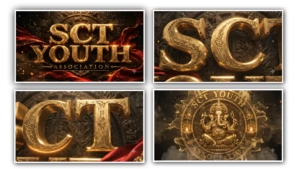
A premium cinematic 3D typography poster with the text “RICH BOYS YOUTH” in massive embossed metallic gold letters, featuring ultra-detailed engraved textures, beveled edges, realistic reflections, and glowing golden highlights. Below it, a smaller metallic gold subtitle reading “ASSOCIATION”.Background: Dark ancient black stone wall with cracked textures and a faint circular carved temple emblem behind the text.Two luxurious deep crimson silk cloth ribbons flow dynamically around the title with realistic fabric physics and elegant motion.Atmosphere filled with glowing orange embers, floating sparks, golden dust particles, subtle smoke, dramatic volumetric lighting, cinematic shadows, warm orange rim light. HDR illumination, high contrast, ultra-realistic, epic festival mood.Centered composition, premium movie title reveal style, luxury branding. Unreal Engine 5, Octane Render, ray tracing, global illumination, photorealistic, 8K, ultra sharp, masterpiece.Aspect Ratio: 16:9