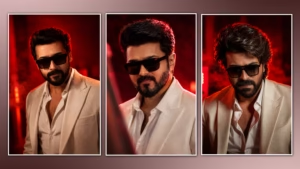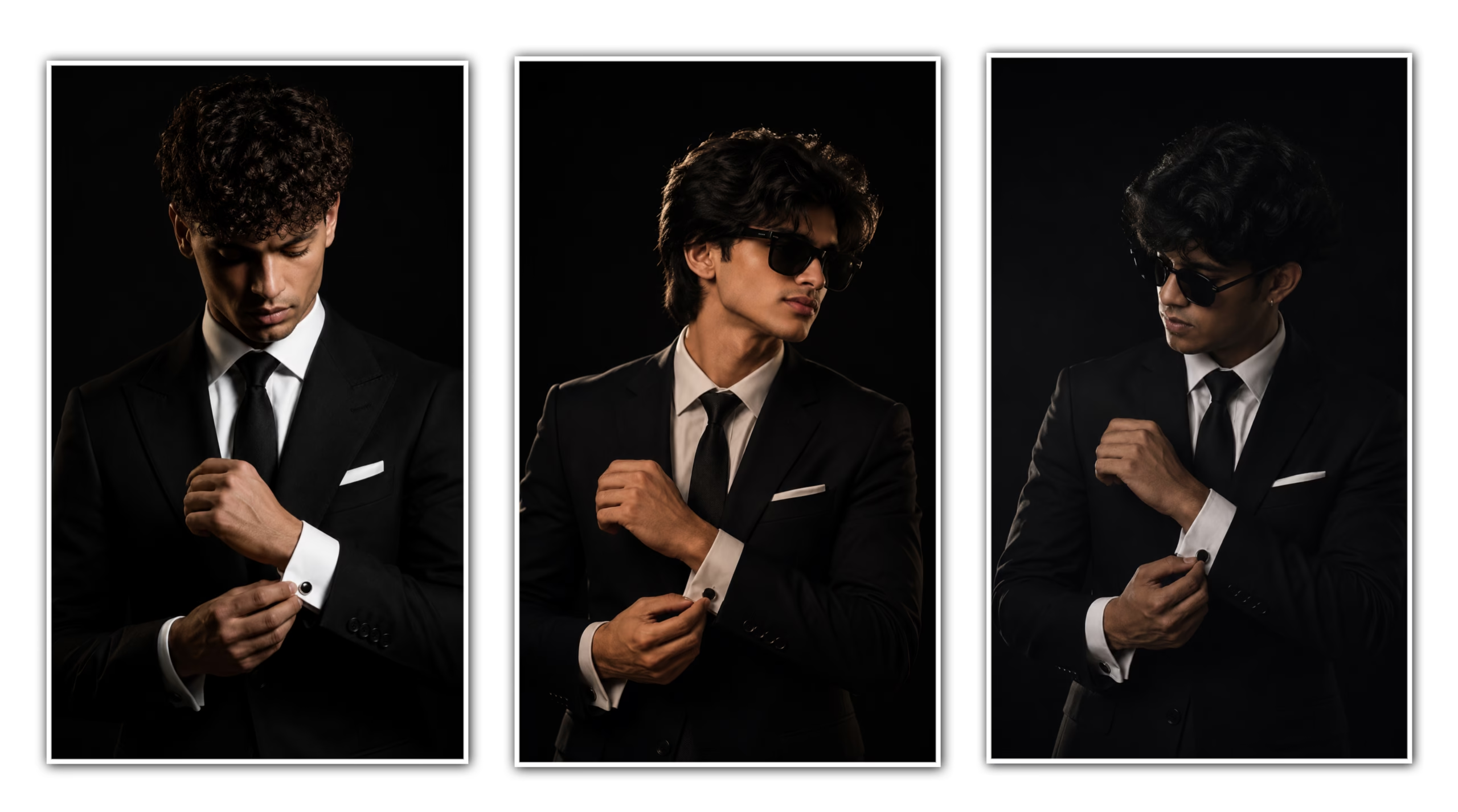
In recent years The Black suit Cinematic Portrait Edit is the one of the most popular photo editing. Scrolling through Instagram or Pinterest or even professional photography portfolios, you will find that cinematic portraits with a black suit are a favourite choice among creators and photographers. A sharp black suit, dramatic lighting, a dark background and cinematic colour grading make for a premium look that immediately pulls viewers into the frame
Many people thinking that creating a cinematic images requires costly cameras and pro editing skills. However, with the right techniques and a basic understanding of editing tools, anyone can achieve a professional-looking cinematic portrait. The secret lies in understanding lighting, contrast, shadows, and color grading rather than relying solely on expensive equipment.
In this guide you’ll learn all you need to know about Black Suit Cinematic Portrait Editing including the key elements, editing process, best apps, practical tips and common mistakes to avoid. By the time you’ve finished this article, you’ll know exactly how to create premium, cinematic portraits that look like they belong on the cover of a fashion magazine.
What Is a Black Suit Cinematic Portrait Edit?
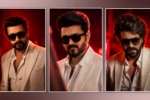
Black Suit Cinematic Portrait Edit is a style of photography/editing meant to create a dramatic cinematic feel. Usually, the subject is dressed in a black suit, with professional lighting and advanced colour grading to produce a luxury visual effect.
This style of editing is meant to make the portrait appear bold and visually striking. Cinematic portraits are about mood and storytelling and atmosphere, not the same things that regular portrait edits are about.
The black suit is important because it automatically produces an effect of sophistication and professionalism. The final image has a dark background and controlled lighting, giving it the look of a luxury fashion campaign or movie poster.
Why is black suit cinematic portrait editing so hot?
Premium & Professional Appearance . The black suit has always been associated with elegance, confidence and success. In portrait photography, it instantly improves the overall visual impact.Social media magnet . Cinematic portraits are a standout on social media platforms. They get more engagement than typical portraits, thanks to the dramatic lighting and professional look
Timeless Style
Unlike trendy filters that quickly become outdated, cinematic editing remains visually appealing for years. This timeless quality makes it popular among photographers and content creators.
Personal Branding
Professionals, entrepreneurs, influencers, and creators frequently use cinematic portraits for personal branding because they create a strong first impression.
Essential Elements of a Perfect Black Suit Cinematic Portrait
Creating a cinematic portrait is about more than simply wearing a black suit. Several elements work together to achieve the final professional look.
1. Well-Fitted Black Suit
The suit should fit properly and complement the subject’s body structure. Wrinkled or oversized clothing can reduce the premium appearance.
2. Controlled Lighting
Lighting is arguably the most important factor in cinematic photography. Soft directional lighting creates depth and highlights facial features while maintaining dramatic shadows.
3. Dark Background
A dark or neutral background helps separate the subject from distractions and enhances the cinematic atmosphere.
4. Strong Facial Expression
Confidence and emotion play a major role in cinematic portraits. A natural and focused expression often produces the best results.
5. Professional Color Grading
Color grading transforms an ordinary image into a cinematic masterpiece. Dark tones, controlled highlights, and balanced contrast create the desired mood.
Camera Settings for Cinematic Portrait Photography
Before editing begins, capturing a high-quality image is essential.
Aperture
Use a wide aperture such as f/1.8 or f/2.8 to create a beautiful background blur and emphasize the subject.
Shutter Speed
A shutter speed of at least 1/125 second helps maintain sharpness and prevents motion blur.
ISO
Keep ISO as low as possible to reduce noise and preserve image quality.
Lens Selection
Portrait lenses such as 50mm, 85mm, or 105mm are excellent choices because they create flattering facial proportions and strong background separation.
Step-by-Step Black Suit Cinematic Portrait Editing Process
Step 1: Adjust Exposure
Start by correcting overall brightness. Ensure that facial details are visible while maintaining darker tones in the background.
Exposure adjustments should be subtle because over-brightening can destroy the cinematic mood.
Step 2: Increase Contrast
Contrast creates separation between highlights and shadows. This adds depth and enhances the dramatic appearance of the portrait.
However, avoid excessive contrast because it can make the image appear unnatural.
Step 3: Improve Facial Details
Focus on enhancing important features such as:
- Eyes
- Hair texture
- Beard details
- Jawline definition
Maintain natural skin texture instead of applying heavy smoothing effects.
Step 4: Refine Shadows
Shadows are a key part of cinematic editing. Deep shadows create mystery and visual depth.
Carefully balance shadows so facial features remain visible while preserving the dramatic atmosphere.
Step 5: Apply Color Grading
Color grading is where the cinematic transformation truly happens.
Popular adjustments include:
- Cooler shadows
- Warm skin tones
- Reduced saturation
- Controlled highlights
- Enhanced blacks
These changes create a professional movie-like appearance.
Step 6: Add Vignette
A subtle vignette darkens the edges of the frame and directs attention toward the subject.
Avoid making the effect too strong because it can become distracting.
Step 7: Final Sharpening
Apply moderate sharpening to important details such as eyes, hair, and clothing texture.
The final image should look crisp without appearing overly processed.
Best Apps for Black Suit Cinematic Portrait Editing
Lightroom Mobile
Lightroom Mobile is one of the most powerful editing applications available for smartphones.
Benefits include:
- Professional color grading
- Advanced masking tools
- Preset support
- Detailed exposure controls
Snapseed
Snapseed is an excellent free option for beginners.
Features include:
- Selective editing
- Curves adjustment
- Portrait enhancement tools
- Easy-to-use interface
Adobe Photoshop
Photoshop remains the industry standard for advanced retouching and professional editing.
It provides complete control over every aspect of the image.
PicsArt
It offers quick cinematic effects and creative editing options which is suitable for social media content like instagram.
My Personal Experience with Black Suit Cinematic Portrait Editing
While experimenting with cinematic portrait editing, I noticed that lighting is plays a key role in editing there is a difference than expensive editing tools. During one portrait session, I used a simple black background and positioned a soft light source at a slight angle.
Initially, the image looked average. However, after increasing contrast, refining shadows, and applying subtle cinematic color grading in Lightroom Mobile, the portrait transformed completely to professional portrait.
The most important lesson I learned was that preserving natural skin texture creates a far more professional result than excessive retouching. Instead of making the skin perfectly smooth, keeping realistic details produced a premium fashion-magazine look.
This experience showed me that understanding light and shadow is often more important than using complicated editing techniques.
Common Mistakes to Avoid
Over-Smoothing Skin
Many beginners remove too much skin texture. This creates an unrealistic plastic appearance.
Excessive Contrast
Too much contrast can destroy facial details and reduce image quality.
Oversaturated Colors
Cinematic portraits generally use controlled and balanced colors. Extremely vibrant colors often reduce the professional feel.
Poor Background Selection
Because of poor background selection we face Busy backgrounds can distract viewers and weaken the cinematic effect.
Heavy Filters
Because of heavy relying entirely on filters usually results in unnatural edits. Manual adjustments produce better outcomes.
Tips for Creating a Professional Cinematic Portrait
Focus on Lighting First
Even the best editing software cannot completely fix poor lighting.
Use High-Quality Images
The better the original image, the better the final edit will be.
Keep Edits Natural
Professional cinematic portraits enhance reality rather than completely changing it.
Give Attention to Details
Give Small adjustments to shadows, highlights, and skin tones often make the biggest difference in it.
Practice Regularly
Cinematic editing improves with experience. Experiment with different editing styles and different lighting setups to develop your skills fastly.
Best Uses of Black Suit Cinematic Portrait Edits
Social Media Profiles
A cinematic portrait can significantly improve the appearance of your profile picture.
Personal Branding
Entrepreneurs and professionals often use cinematic portraits to establish credibility.
Fashion Portfolios
Photographers and models frequently include cinematic portraits in their portfolios.
Nowadays
Wallpapers
These dramatic visual style edits makes these portraits ideal for mobile and desktop wallpapers.
Marketing Materials
Most of the Businesses and creators Do promotional content and branding campaigns through cinematic portraits
Frequently Asked Questions
What is a Black Suit Cinematic Portrait Edit?
It is a professional portrait editing style that combines dramatic lighting, cinematic color grading, and a black suit to create a luxury fashion-inspired appearance.
Which app is best for cinematic portrait editing in Recent Times ?
Lightroom Mobile is one of the most recommended apps because it have advanced editing features with best user-friendly interface.
Can beginners create cinematic portraits?
Yes. You can create With basic knowledge of lighting and editing tools, beginners can achieve impressive cinematic results when You Try To edit potraits.
Why is a black suit commonly used?
It conveys naturally elegance, professionalism, and confidence, making it ideal for cinematic portraits.
How important is lighting?
Lighting is essential to create these images and it is important because it determines the mood, depth, and overall quality of the Portrait.
Do I need a professional camera?
No because Modern smartphones combined with proper lighting and editing tricks & techniques can produce excellent cinematic portraits in Recent Times
Conclusion
Professionally and visually striking images.Black Suit Movie Portrait Editing is a great way to make progress pictures 🙂 You can get premium fashion style photos out of ordinary portraits if you put on a well fitted black suit, control the lighting, add dramatic shadows and use cinematic colour grading..
The Main Keys to success are focusing on strong fundamentals such as lighting, composition, and natural editing. Expensive equipment can help, but understanding how light interacts with your subject is far more important In Editing.
Whether you’re a photographer, content creator, influencer or just love creative photo editing, learning Black Suit Cinematic Portrait Editing can take your images to the next level. Start applying the techniques in this guide, and you will naturally develop your own unique cinematic editing style that stands out from the crowd over time.